You probably started with a script that worked on one page. It fetched HTML, grabbed a few elements, and gave you a clean CSV. Then the actual site showed up. Product cards loaded after JavaScript. Pagination changed. The site blocked your IP after a burst of requests. A week later, the selectors broke.
That’s the normal path in web crawling Python. The hard part isn’t writing the first script. It’s knowing when the current approach has reached its limit, and what to use next without overbuilding too early.
Python has been the dominant programming language for web crawling since the early 2010s, and its ecosystem often makes it the preferred starting point. Libraries like BeautifulSoup, Scrapy, Selenium, and Playwright made extraction practical across both simple and dynamic sites, and that broader evolution cut maintenance overhead by up to 40% in large-scale operations as teams trained models to detect layouts automatically.
Your First Python Web Crawler
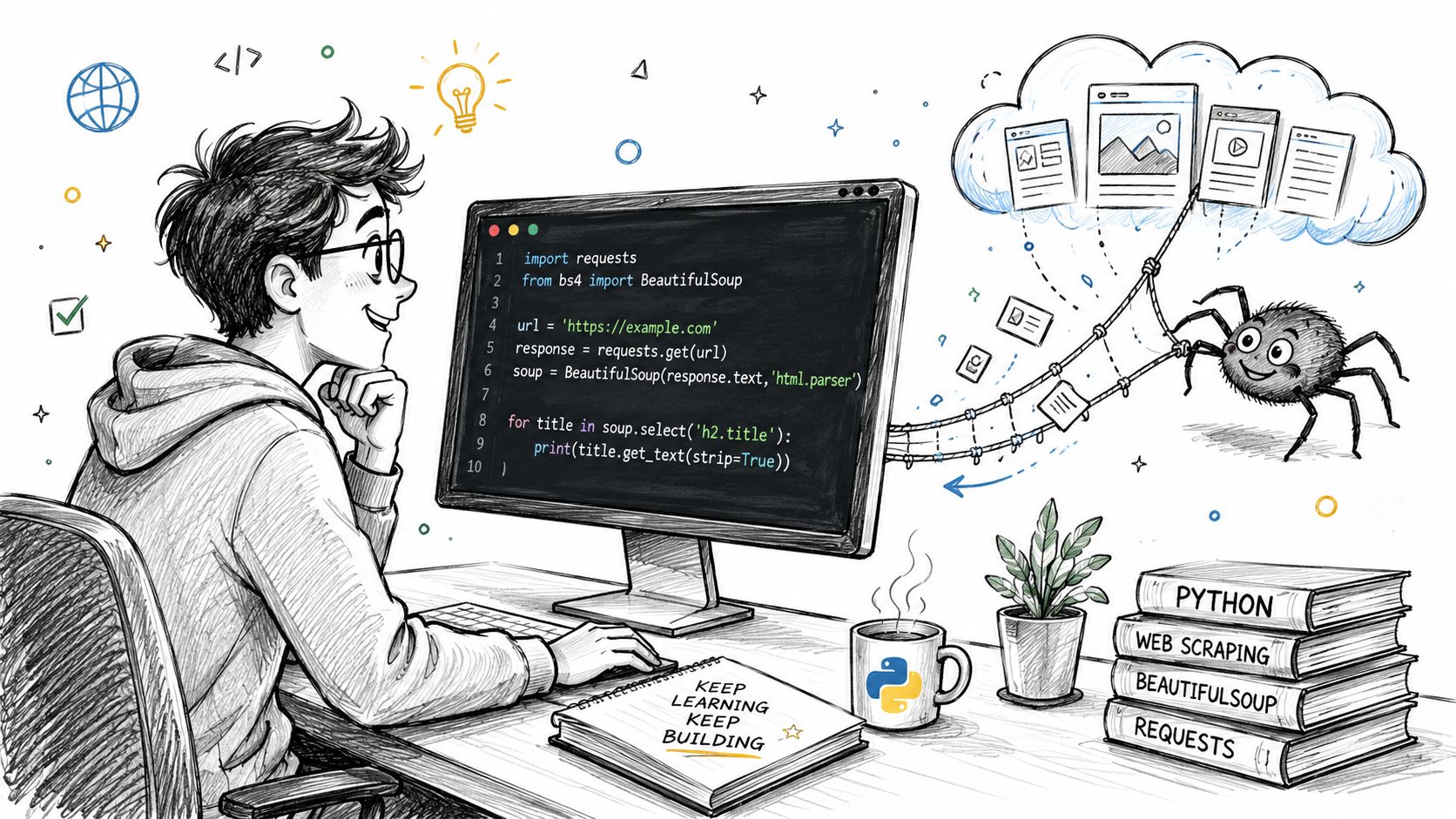
The usual first job is simple. You have a page with visible HTML, you need a few fields, and you want an answer today, not a framework next week. That’s where requests and BeautifulSoup still earn their keep.
Start with one page and one job
Say you need titles and links from a static list page. Keep the first version narrow.
import requests
from bs4 import BeautifulSoup
from urllib.parse import urljoin

URL = "https://scrapingsandbox.com"

headers = {
    "User-Agent": "Agenty/1.0"
}

response = requests.get(URL, headers=headers, timeout=15)
response.raise_for_status()

soup = BeautifulSoup(response.text, "html.parser")

for card in soup.select(".product-card"):
    title_node = card.select_one("h3")
    if not title_node:
        continue

    title = title_node.get_text(strip=True)
    link = urljoin(URL, card.get("href", ""))
    print({"title": title, "url": link})
That script is enough for a lot of internal tasks. It’s readable, fast to debug, and cheap to run. For a junior engineer, it also teaches the right mental model: fetch the page, inspect the DOM, select the node, normalize the URL, validate missing fields.
A few habits matter even at this stage:
- Set a user agent so the request doesn’t look like a default bot.
- Use timeouts so one bad response doesn’t hang the whole run.
- Check for missing nodes because real HTML is messy.
-
Normalize links with
urljoininstead of trusting relative paths.
If the target site has many sections, a quick way to map candidates before writing selectors is a sitemap crawler tool. It helps you separate discovery from extraction, which saves time when the site structure is bigger than it first looks.
Practical rule: If the data is already present in the initial HTML response, don’t start with a browser.
Know what this approach cannot do
The first script fails in predictable ways. It won’t execute JavaScript to render dynamic website . It won’t handle endless pagination cleanly. It won’t recover gracefully when one parser change breaks downstream logic. And it usually grows into a single file that nobody wants to touch.
A simple test tells you whether you’ve outgrown it. Open DevTools, reload the page, and inspect the raw response. If the content you need is missing from the initial HTML, or if the page skeleton arrives first and content appears later, requests isn’t your tool anymore.
That’s the first real decision point in web crawling Python. Don’t leave the simple path until the page forces you to.
Handling JavaScript with Playwright
A lot of broken scrapers aren’t broken at all. They’re parsing the wrong thing. The HTML response is just a shell, and the actual data appears after scripts run in the browser.
Run the rendering litmus test first
Before launching Playwright, check whether rendering is necessary. That sounds obvious, but many teams skip it and pay for browser automation they didn’t need.
Use this quick decision filter:
-
Fetch the page with
requestsand inspectresponse.text. - Search for the target content in that raw HTML.
- Look for clues like heavy script tags, empty container divs, or placeholder markup.
- Inspect network calls in the browser to see whether the page pulls JSON after load.
Over 60% of modern e-commerce sites use dynamic rendering, yet many Python crawler tutorials still don’t explain when to escalate from static parsing to a headless browser like Playwright, which leads to common missing-data failures in pipelines, as noted in this video discussion on dynamic rendering decisions.
That gap matters in practice. Browser automation is slower, heavier, and easier to detect. You should use it because the site requires it, not because tutorials made it look like the default.
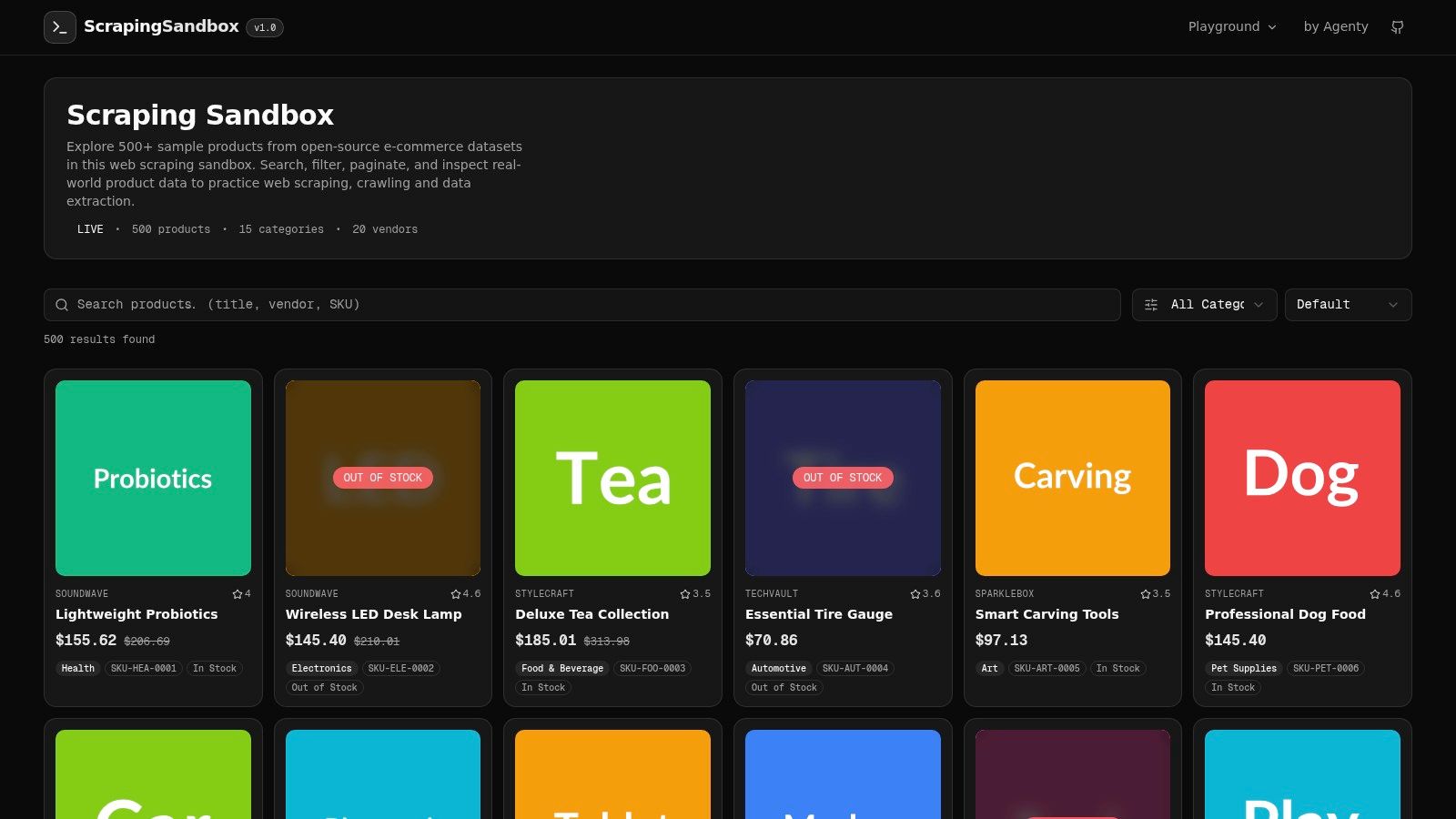
Playwright example on Scraping Sandbox
Here’s a Python example against Scraping Sandbox. The point isn’t just to click around. It’s to wait for the right state, then extract stable fields.
from playwright.sync_api import sync_playwright

TARGET_URL = "https://scrapingsandbox.com/"

with sync_playwright() as p:
    browser = p.chromium.launch(headless=True)
    page = browser.new_page()

    page.goto(TARGET_URL, wait_until="domcontentloaded")

    # Wait until product cards are visible
    page.wait_for_selector(".product-card")

    products = []
    cards = page.locator(".product-card")
    count = cards.count()

    for i in range(count):
        card = cards.nth(i)
        name = card.locator(".product-title").inner_text().strip()
        price = card.locator(".product-price").inner_text().strip()
        products.append({
            "name": name,
            "price": price
        })

    for product in products:
        print(product)

    browser.close()
A few implementation details are doing real work here:
-
wait_until="domcontentloaded"gets the browser to the page quickly. -
wait_for_selector(".product-card")avoids racing the DOM. - Scoped locators per card keep selectors local and easier to maintain.
If the site uses infinite scroll, load-more buttons, or modal interactions, extend the same pattern. Trigger one interaction, wait for a specific selector, then extract. Don’t keep a browser session open longer than the page requires.
If a page only needs one click to reveal data, automate that click and exit. Don’t build a full browser workflow around a tiny interaction.
This walkthrough is useful if you want to see a browser-driven scraping flow in action:
Puppeteer example for the same page
If your team also works in Node.js, the same target can be handled with Puppeteer. The extraction logic is nearly identical.
const puppeteer = require("puppeteer");

(async () => {
  const browser = await puppeteer.launch({ headless: true });
  const page = await browser.newPage();

  await page.goto("https://scrapingsandbox.com/", {
    waitUntil: "domcontentloaded"
  });

  await page.waitForSelector(".product-card");

  const products = await page.$$eval(".product-card", cards =>
    cards.map(card => ({
      name: card.querySelector(".product-title")?.innerText?.trim() || "",
      price: card.querySelector(".product-price")?.innerText?.trim() || ""
    }))
  );

  console.log(products);
  await browser.close();
})();
Choose Playwright when you want stronger locator ergonomics and a cleaner modern automation API in Python. Choose Puppeteer if your stack is already JavaScript-heavy and the crawler will live alongside Node services. The key decision isn’t Playwright versus Puppeteer. It’s browser versus no browser.
Building for Scale with the Scrapy Framework
Single-file crawlers usually die from success. They start as one useful script, then absorb pagination, retries, deduplication, storage, proxies, logging, and several parsing branches. At that point, the problem isn’t extraction. It’s architecture.
Why scripts collapse at higher volume
Production crawling needs separation of concerns. One part should discover URLs. Another should extract fields. A third should validate and store items. If all of that sits in one loop, one failure tends to contaminate everything else.
According to Import.io’s discussion of Python web scraping trade-offs, simple requests libraries are insufficient for production crawling. A hierarchical scraper design that separates crawling paths from data extractors is needed to prevent cascading errors, and successful scraping also requires HTTP clients that transmit real browser fingerprints to get past IP bans.
That’s where Scrapy helps. It forces structure on a problem that gets chaotic fast.
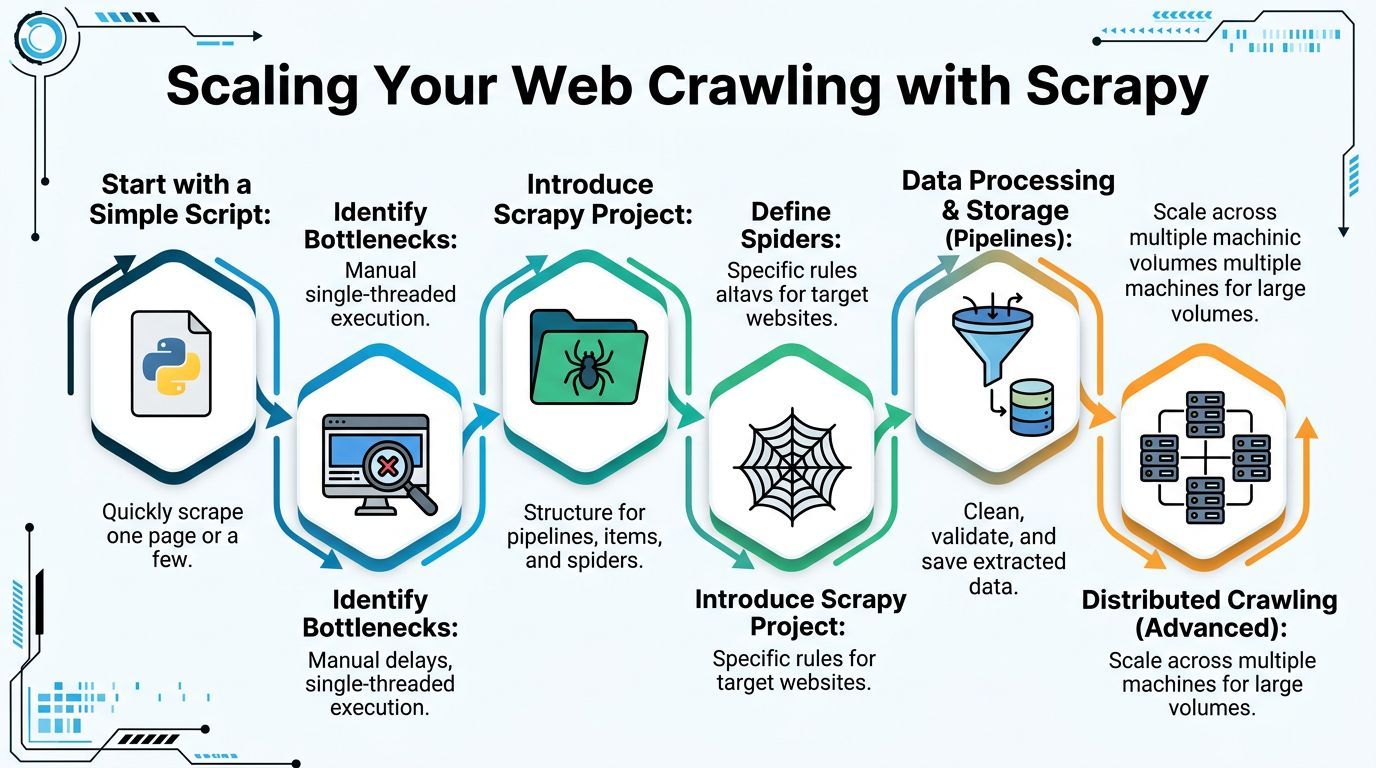
A Scrapy project structure that stays maintainable
A good Scrapy project feels different from a script because each part has a job:
- Spider handles where to go and what to follow.
- Item defines the shape of extracted data.
- Pipeline cleans, validates, and stores.
- Middleware adjusts requests and responses.
Here’s a minimal structure for a product crawl:
# spiders/products.py
import scrapy

class ProductsSpider(scrapy.Spider):
    name = "products"
    allowed_domains = ["scrapingsandbox.com"]
    start_urls = ["https://scrapingsandbox.com/"]

    def parse(self, response):
        for card in response.css(".product-card"):
            yield {
                "name": card.css(".product-title::text").get(default="").strip(),
                "price": card.css(".product-price::text").get(default="").strip(),
            }

        next_page = response.css("a.next::attr(href)").get()
        if next_page:
            yield response.follow(next_page, callback=self.parse)
Then put your cleanup logic in a pipeline instead of stuffing it into the spider:
# pipelines.py
class CleanProductPipeline:
    def process_item(self, item, spider):
        item["name"] = item.get("name", "").strip()
        item["price"] = item.get("price", "").strip()

        if not item["name"]:
            raise ValueError("Missing product name")

        return item
This is the part junior developers often miss. Scrapy isn’t just faster because it’s asynchronous. It’s better because it makes you stop mixing concerns.
Senior habit: Keep crawl logic, extraction logic, and storage logic in different places. That’s how you debug fast when a site changes.
A few design choices pay off early:
| Component | Keep it responsible for | Don’t let it absorb |
|---|---|---|
| Spider | URL flow and parsing entry points | Data cleanup rules |
| Pipeline | Validation and normalization | Navigation logic |
| Middleware | Headers, retries, request shaping | Field extraction |
| Settings | Concurrency and throttling | Site-specific parsing |
When the volume grows further, teams often split crawlers by resource type. Products, reviews, and images don’t always belong in one spider. Separate them when their pagination, validation, and failure modes differ. That keeps one bad page type from taking down the rest of the job.
The Crawler’s Code of Conduct and Best Practices
Reliable crawlers tend to look polite from the outside. That’s not a moral slogan. It’s operationally useful. Sites tolerate crawlers that behave predictably, identify themselves, and don’t hammer endpoints.
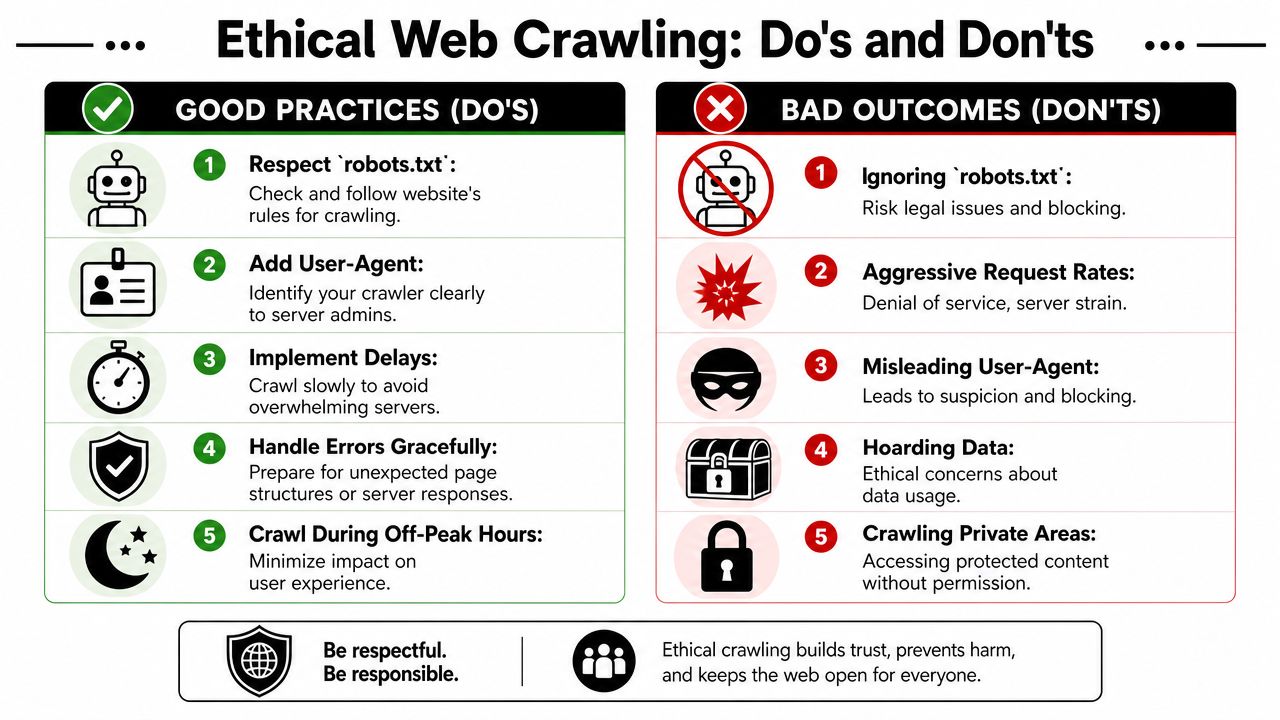
Treat politeness as part of reliability
The controls that make a crawler respectful also make it harder to break. GroupBWT’s write-up on scraping challenges notes that Python scrapers using proxy rotation, rate limiting, and proper user-agent headers achieve success rates over 99%, while scrapers without those controls see over 60% of requests blocked by 403 errors or CAPTCHAs.
That should change how you think about best practices. robots.txt, delays, and honest identification aren’t optional extras for documentation pages. They’re part of the crawler’s survival kit.
A practical checklist before every run
Use a short checklist before you schedule or scale anything:
-
Read
robots.txtfirst. If the site disallows a path, respect it. If the file sets crawl preferences, treat them as the baseline. - Set a clear user agent. Don’t masquerade as random browser traffic if your crawler can identify itself appropriately.
- Throttle intentionally. Fixed delays are crude but better than bursts. Adaptive pacing is better when the target starts slowing down.
- Handle failures cleanly. Retry transient issues, log parser misses, and isolate bad pages instead of crashing the run.
- Avoid private surfaces. Login-protected pages, internal tools, and personal data areas are a different class of risk.
A lightweight robots.txt check in Python looks like this:
from urllib.robotparser import RobotFileParser

robots = RobotFileParser()
robots.set_url("https://example.com/robots.txt")
robots.read()

user_agent = "MyCrawlerBot"
url = "https://example.com/catalog"

if robots.can_fetch(user_agent, url):
    print("Allowed to crawl")
else:
    print("Blocked by robots.txt")
That doesn’t solve every legal or ethical question, but it stops the most common avoidable mistake.
Crawl like someone from the target company will read your logs. If the request pattern looks reckless, fix the crawler before they fix it for you.
Navigating Proxies and Anti-Detection
Even careful crawlers hit defenses. Some sites block by IP reputation. Others compare headers, cookies, TLS behavior, timezone, or browser fingerprints. The mistake is treating every block as a proxy problem.
Match the defense to the block you see
Start with symptoms, not tools.
If you get intermittent 403s after a burst of traffic, pacing might be the issue. If static requests fail but a real browser works, the site may be checking fingerprint signals. If pages differ by geography, location-aware routing matters more than raw proxy rotation.
For teams dealing with region-sensitive access, especially workflows that need stable internet for China professionals, network quality and route consistency can matter as much as the proxy pool itself. That’s a practical concern when your crawler depends on reliable session continuity across borders.
What good anti-detection actually looks like
Anti-detection done well is boring. It removes obvious tells.
A few patterns are worth keeping:
- Header consistency matters. Don’t send browser-like headers with a request stack that behaves nothing like a browser.
- Session handling matters. Some sites expect cookies and navigation state to evolve naturally.
- Fingerprint alignment matters. Browser timezone, language, and proxy geography should make sense together.
- Tooling matters. If you need to inspect or debug request identities, a user-agent parser helps verify what you’re sending.
The same GroupBWT source cited earlier highlights a specific detection giveaway: timezone and proxy mismatch can trigger immediate blockouts on non-optimized sessions. That’s the kind of issue junior teams often miss because the requests “look fine” in code.
Use escalation, not panic. Start with rate limits and proper headers. Move to better HTTP clients and fingerprint handling when the target forces you there. Use browsers only when the site requires browser behavior. Every extra layer increases cost, latency, and maintenance.
When to Stop Building and Start Using a Platform
There’s a point where your crawler stops being a data pipeline and starts becoming infrastructure work. You’re no longer collecting data. You’re maintaining selectors, rotating proxies, scheduling runs, reviewing failures, and explaining why last night’s export came back half-empty.
The build versus buy signals
A custom stack still makes sense when the target is narrow, the HTML is stable, and the crawl logic is part of your product advantage. Keep building when the crawler is small enough that one engineer can understand the whole flow.
Stop and reassess when these signs show up:
- One schema change on the site breaks several parsers.
- Your team spends more time maintaining extraction than using the data.
- Scheduling, retries, and proxy logic are now separate projects.
- Browser rendering and anti-detection are consuming engineering hours every week.
- Business users need repeatable runs, exports, and monitoring, not ad hoc scripts.
That shift has a long history. Visual scraping tools appeared in the late 1990s to let non-programmers extract data, and today AI-assisted scrapers represent a third major evolution, using semantic understanding and JavaScript rendering to reduce selector maintenance tasks by over 60% in enterprise environments, according to WebScraper.io history of web scraping
That doesn’t mean code is obsolete. It means maintenance has become a first-class cost.
What changes when a platform takes over
The biggest gain isn’t convenience. It’s focus. A managed system takes over the repetitive parts: rendering, scheduling, retries, anti-detection, exports, and operational visibility.
If you’re evaluating that route, it helps to read outside vendor pages and compare approaches directly. This roundup on comparing web scraping APIs is useful because it frames the decision around capabilities, not just marketing claims.
The right handoff point usually comes when your team needs reliability more than control. That’s when a hosted crawling layer starts to make economic sense. You still define targets, schemas, and downstream logic. You just stop spending your best engineering time on scraper upkeep.
For teams that need a managed route for recurring jobs, scheduled extraction, and API-driven delivery, a crawling agent platform is the category to evaluate. The smart decision isn’t “always build” or “always buy.” It’s choosing the tool that matches the current cost of maintenance.