
You’re probably here because your scraper worked in local testing, then collapsed in production. The first few hundred requests looked fine. Then came the 403s, CAPTCHAs, empty pages, and sudden bans that made the whole pipeline feel fragile.
That’s the point where many teams search for how to create proxy infrastructure and find the wrong answers. A lot of those results are about video editing proxies, not network proxies. For web scraping, you need the network kind: a server or service that routes your requests through another IP so the target site doesn’t only see your machine.
Why Proxies Are Essential for Web Scraping
Many who search for “create proxy” are trying to generate video editing proxy files, not build network infrastructure. For scraping, that distinction matters. Many searches for “create proxy” are from video editors, but for web scraping, a network proxy is essential. A 2024 analysis showed that implementing proxy rotation can drop scraping failure rates from 45% to under 8% and increase successful data extraction by up to 300% according to the proxy rotation analysis for scraping workflows.
Once a target starts tracking request frequency, geography, session patterns, and browser fingerprints, direct scraping from one IP stops being reliable. A proxy changes the path your traffic takes. This allows for a good proxy strategy that spreads requests across multiple identities instead of hammering a site from one address.
That’s why teams building structured extraction pipelines usually treat proxies as infrastructure, not as a last-minute fix. If you also need post-processing for the collected pages, Markdown Converters API are useful when you want scraped content converted into cleaner downstream formats for analysis or LLM pipelines. If you’re comparing that route with hosted extraction workflows, the Web Scraping Agent is worth reviewing for jobs where maintaining your own browser and proxy stack starts eating too much engineering time.
Practical rule: If a site matters enough to scrape continuously, it matters enough to put a proxy strategy in front of it.
The important shift is mental. Don’t think in terms of “a proxy server.” Think in terms of access resilience. A single proxy can get you through testing. A real scraping project needs a setup that can survive bans, rotate identities, and keep request patterns under control.
Choosing Your Proxy Strategy Datacenter vs Residential
Before you build anything, decide what kind of traffic identity you need. Mistakes in many DIY proxy projects often stem from this point. Teams optimize for low price or raw speed first, then discover that the target doesn’t care how fast their requests are if the IPs look synthetic.
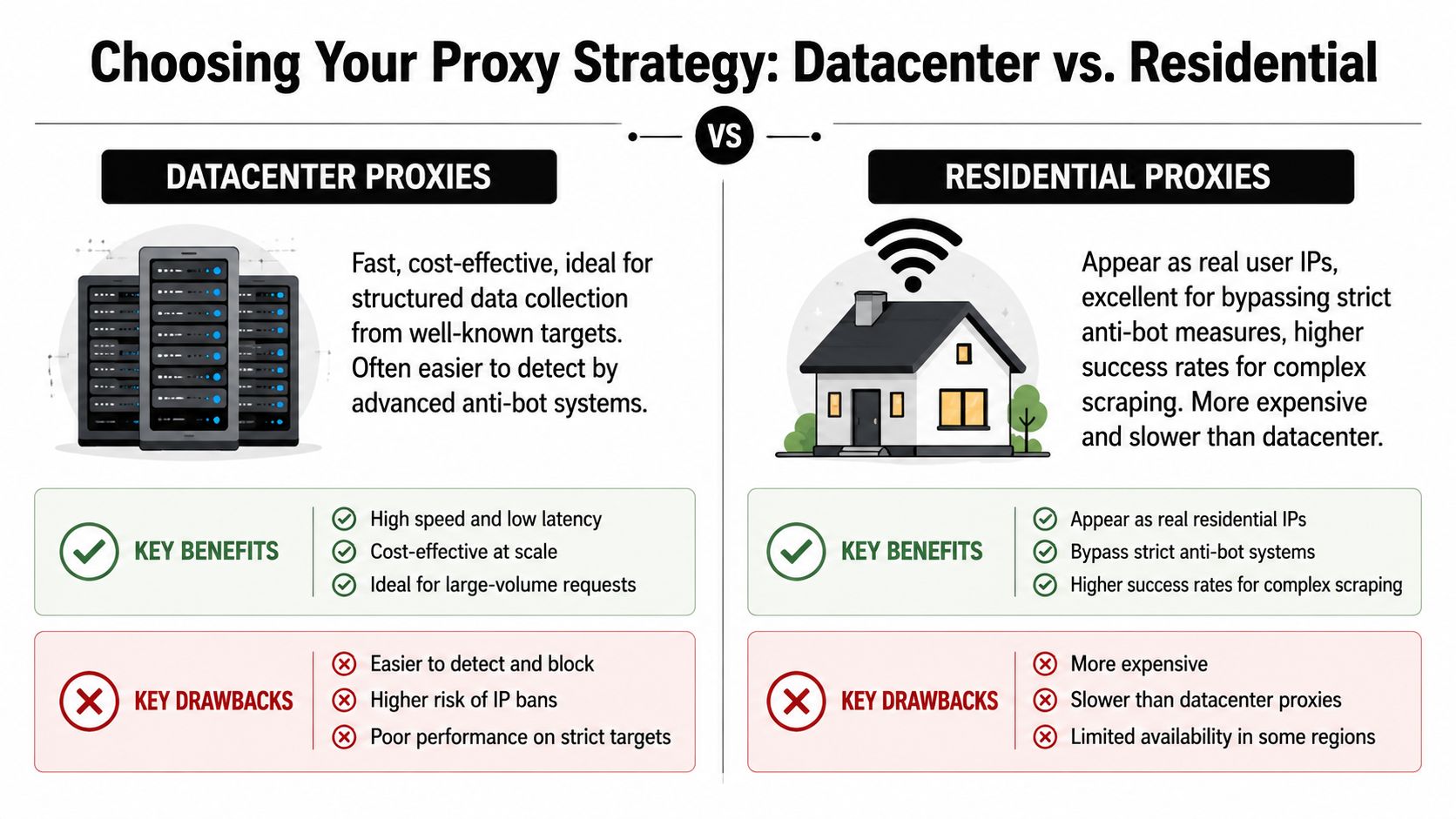
What each proxy type is good at
Datacenter proxies come from cloud or hosting infrastructure. They’re usually the fastest and simplest option. They work well when the target is lightly protected, the pages are mostly static, and throughput matters more than stealth.
Residential proxies come from consumer IP space. They look more like normal user traffic and are the better choice when you’re dealing with search engines, retail sites, travel portals, or anything with aggressive bot management. The trade-off is cost, lower speed, and less predictability.
Static IP proxies sit in the middle for some workflows. They’re useful when a target values session continuity, account consistency, or a stable origin over heavy rotation. They can help for logged-in workflows, but they don’t solve broad anti-bot problems on their own.
Residential proxies are key for bypassing advanced bot detection, while datacenter proxies suit unprotected sites. To calculate needs, use the formula -
Required IPs = (Target RPM ÷ Safe requests per IP per minute) × 1.2.
Enterprise projects often require over 10,000 rotating residential IPs**, as noted in this proxy sizing and residential scraping guide
Here’s the decision view I use in practice:
| Feature | Datacenter Proxy | Residential Proxy | Static IP Proxy |
|---|---|---|---|
| Best fit | Fast collection on lower-friction sites | High-friction targets with stronger bot defenses | Session-stable workflows |
| Speed | Usually faster | Usually slower | Depends on provider and route |
| Cost profile | Lower | Higher | Middle, varies by vendor |
| Detection risk | Higher on protected targets | Lower on protected targets | Moderate |
| Geo flexibility | Available, but often easier to flag | Strong for country and city targeting | Good when stable presence matters |
| Good for | Product pages, public directories, test runs | Search results, dynamic retail, geo-restricted content | Logged-in sessions, account consistency |
A simple way to estimate pool size
The pool size formula matters because under-sizing is one of the easiest ways to burn a proxy network.
- Start with your target RPM. That’s the request volume your scraper needs to sustain.
- Estimate safe requests per IP per minute. This depends on target sensitivity, page type, and whether the site serves static HTML or dynamic content.
-
Apply the multiplier. The
× 1.2buffer covers retries and concurrency spikes.
If the number looks bigger than you expected, that’s normal. Many teams underestimate how quickly retries, pagination, and browser-based rendering expand request volume.
Cheap IPs don’t stay cheap when they trigger blocks, retries, and repeated browser sessions.
If you’re still early, run a small controlled test with the target using the proxy class you think will work. Don’t guess from vendor marketing. The right proxy type is the one that keeps extraction stable without forcing constant workarounds in the scraper itself.
How to Create a Basic Proxy Server with Squid
If you want full control, Squid is still a practical place to start. It’s mature, widely used, and good enough for a basic forward proxy that your scripts or browsers can route through.
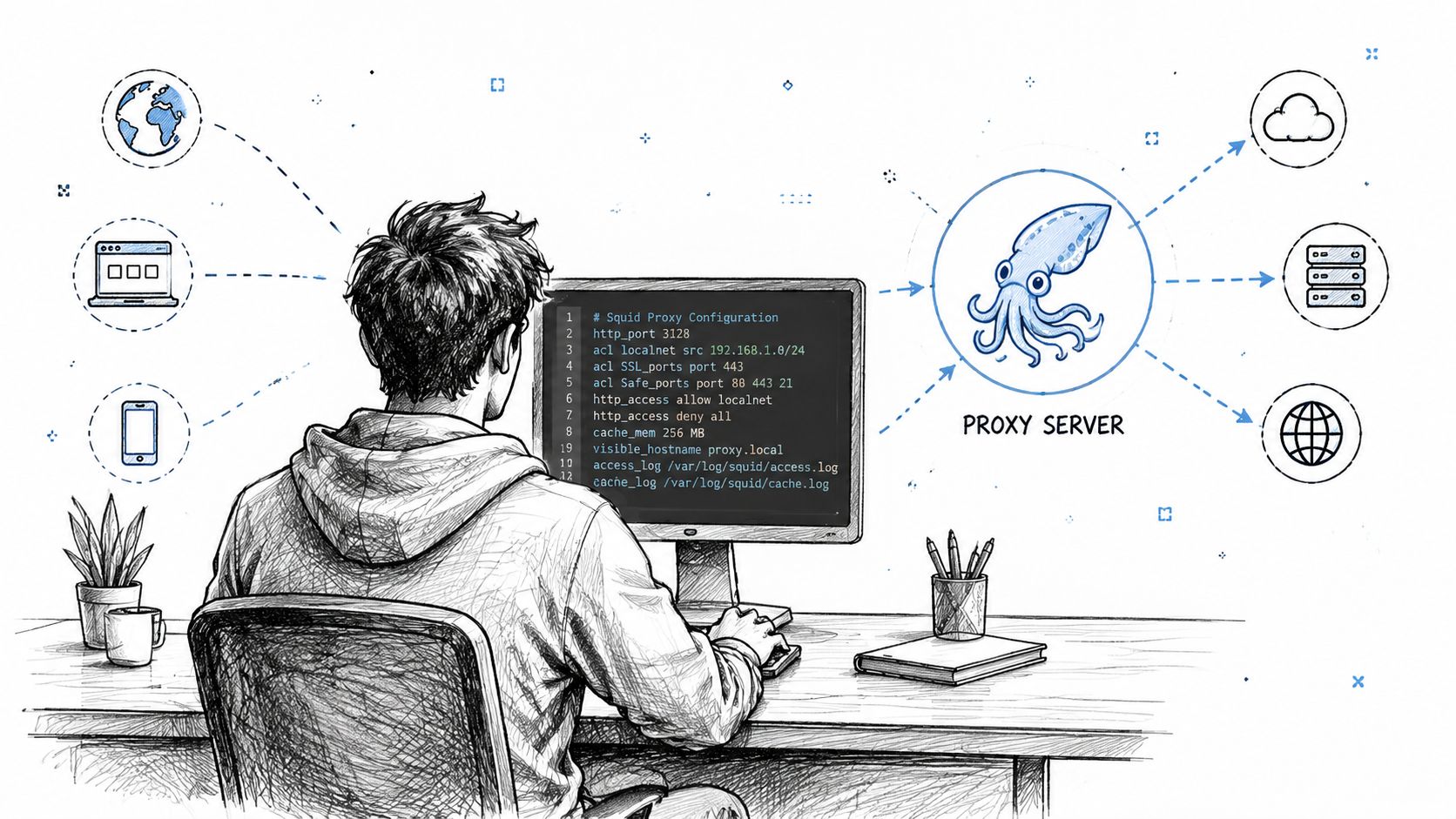
The goal here isn’t to build a globally resilient scraping network from one box. The goal is to create a working, secured proxy that you can test locally and integrate into automation. That gives you a clean baseline before you decide whether to keep scaling the DIY path.
Install Squid and start with the minimum config
On a Linux server, install Squid with your package manager, then work from the main squid.conf file. The most important first setting is the listening port. A common choice is:
http_port 3128
From there, keep the initial config small. You want three things in place before anything else:
- A listening port so clients know where to connect.
- Access controls so only approved clients can use the proxy.
- Authentication if more than one person or process will use it.
A stripped-down example looks like this:
http_port 3128

acl allowed_clients src YOUR_ALLOWED_RANGE
http_access allow allowed_clients
http_access deny all
Replace the placeholder with the allowed client range for your environment. Don’t copy permissive examples from random tutorials. When building a proxy with Squid, defining the listening port (http_port 3128) and securing access with ACLs is critical. 95% of unauthorized abuse on self-hosted proxies comes from unsecured access controls, while incorrect ACL syntax and blocked firewall ports cause most initial connection failures, according to this Squid proxy setup reference.
Lock down access before you test anything
The biggest beginner mistake is making the proxy reachable before restricting who can use it. That turns your server into an open relay, and open relays attract abuse fast.
Use this checklist before any scraper touches the proxy:
- Restrict client access: Only allow known source ranges or known hosts.
- Enable authentication: Even on internal teams, credentials reduce accidental misuse.
- Deny by default: End the config with an explicit deny rule.
- Check firewall rules: If the service is up but unreachable, the port may not be open where it needs to be.
- Review ACL syntax carefully: Small syntax mistakes can break valid traffic or accidentally allow everything.
A proxy that “works” without access controls is usually the start of a different problem.
Squid also gives you caching controls. That can help when you’re proxying repeated requests to the same resources, although browser-driven scraping of dynamic sites often gets less benefit from cache than teams expect. Keep cache tuning conservative at first. Reliability matters more than chasing small performance gains during setup.
Test the proxy like a scraper would use it
Don’t stop at “the service started.” Test it the same way your scraping client will use it. That means configuring a browser or HTTP client to route traffic through the proxy, making a real request, and confirming both connectivity and expected behavior.
A simple validation sequence looks like this:
- Start the service with your init system.
- Confirm the process is listening on the configured port.
- Route a browser through the proxy and load a public page.
- Try an unauthorized client and confirm it gets denied.
- Inspect logs for ACL matches, denials, and auth failures.
Here’s a useful walkthrough if you want a visual setup reference while configuring and debugging:
A basic Squid server is enough for local testing, controlled integrations, or small internal jobs. It isn’t enough for sustained scraping against modern anti-bot systems. But it teaches the right lessons early: access control, authentication, and observability matter more than getting a single request through.
Integrating Proxies with Playwright and Puppeteer
A proxy isn’t useful until your browser automation is able to use it. The simplest validation path is to point Playwright or Puppeteer at a real test target and confirm page access through the proxy. For that, Scraping Sandbox is a good target because you can test interaction without burning a real production site.
If you’re also working on browser stealth and anti-bot hardening, Playwright for web scraping anti-bot is a useful companion read. For broader implementation details around hosted scraping workflows, the Agenty developer docs are also practical.
Playwright example against Scraping Sandbox
Use the proxy when launching the browser. If your proxy requires authentication, pass the username and password in the proxy config.
const { chromium } = require('playwright');

(async () => {
  const browser = await chromium.launch({
    headless: true,
    proxy: {
      server: 'http://YOUR_PROXY_HOST:3128',
      username: 'YOUR_PROXY_USERNAME',
      password: 'YOUR_PROXY_PASSWORD'
    }
  });

  const page = await browser.newPage();

  await page.goto('https://scrapingsandbox.com/', {
    waitUntil: 'domcontentloaded'
  });

  const title = await page.title();
  console.log('Page title:', title);

  const bodyText = await page.locator('body').innerText();
  console.log(bodyText.slice(0, 500));

  await browser.close();
})();
For an unauthenticated proxy, remove username and password.
Puppeteer example against Scraping Sandbox
Puppeteer passes the proxy at launch time with a browser argument. If the proxy requires authentication, call page.authenticate() before the navigation.
const puppeteer = require('puppeteer');

(async () => {
  const browser = await puppeteer.launch({
    headless: true,
    args: ['--proxy-server=http://YOUR_PROXY_HOST:3128']
  });

  const page = await browser.newPage();

  await page.authenticate({
    username: 'YOUR_PROXY_USERNAME',
    password: 'YOUR_PROXY_PASSWORD'
  });

  await page.goto('https://scrapingsandbox.com/', {
    waitUntil: 'domcontentloaded'
  });

  const title = await page.title();
  console.log('Page title:', title);

  const bodyText = await page.evaluate(() => document.body.innerText);
  console.log(bodyText.slice(0, 500));

  await browser.close();
})();
What to verify when the browser still gets blocked
If the code runs but the site still pushes back, the issue may not be the proxy alone.
- Check proxy reachability: Make sure the browser can connect through the endpoint.
- Confirm auth is accepted: Bad credentials can fail without clear indication in some setups.
- Watch for browser signals: A working proxy won’t hide automation fingerprints by itself.
- Slow down navigation patterns: Bursty page loads can still trip defenses.
- Keep sessions coherent: Some sites react badly when IP, headers, and cookies change too often.
Browser automation and proxying work together. A clean proxy path gets you network indirection. The browser layer still needs sane headers, believable timing, and request pacing.
Scaling Up From a Single Server to a Rotating Proxy Pool
One proxy is a tool. A rotating pool is a system. That change matters because scraping at any meaningful volume creates repeated patterns, and repeated patterns are what anti-bot systems look for.
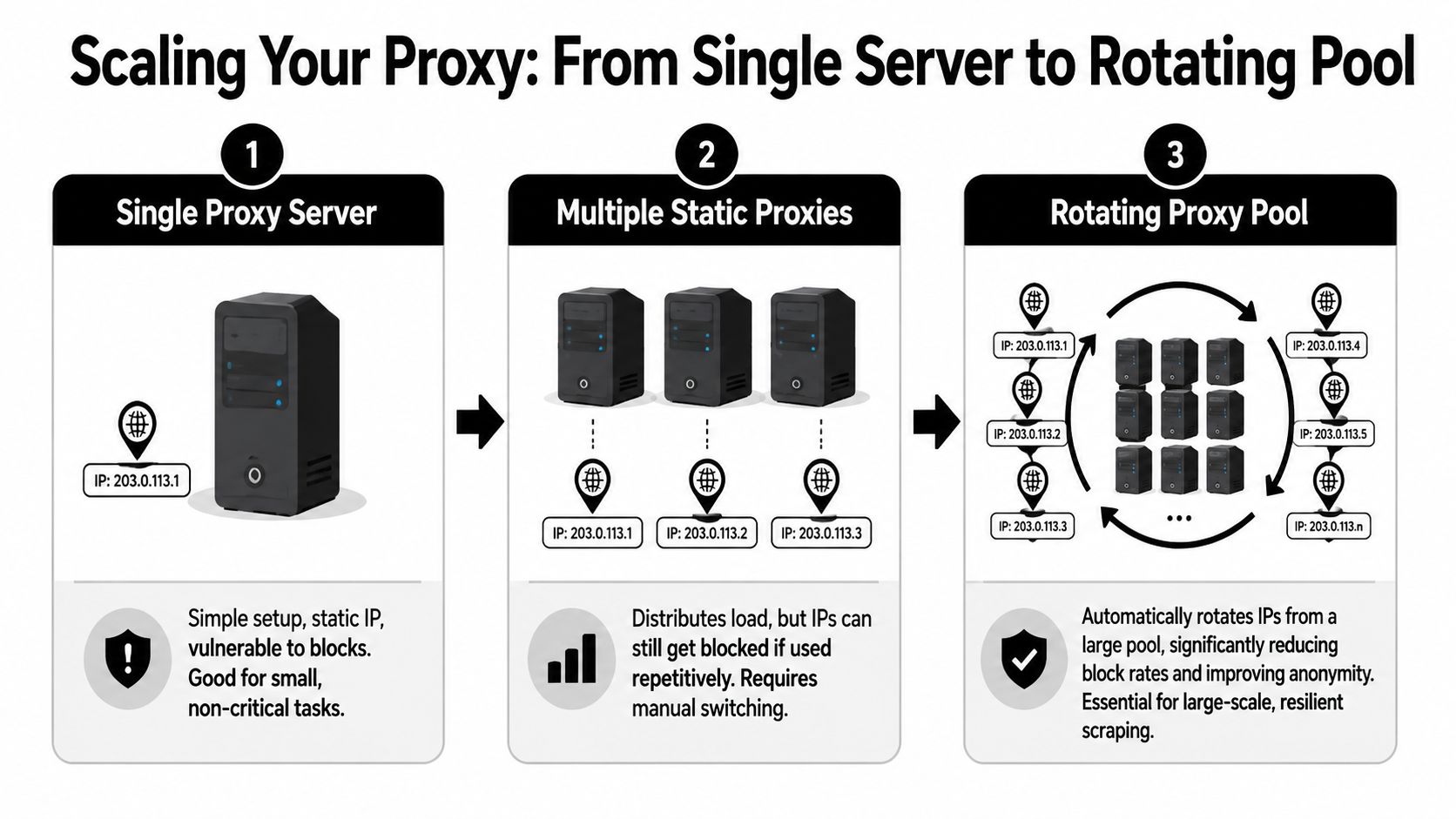
A proxy’s main job in scraping is straightforward. It acts as an intermediary so the target sees the proxy’s IP instead of your scraper’s original IP. That intermediary model lets you distribute requests, manage rate limits, and access geo-specific content, as described in this web scraping proxy glossary.
What changes when you move beyond one proxy
With a single self-hosted server, every request shares the same identity. That’s fine for low-risk tasks. It breaks down when you need sustained access, geographic variation, or resilience after bans.
A rotating pool adds several moving parts:
- A proxy inventory: The list of available proxy endpoints and their metadata.
- A selection policy: Random choice, round-robin, sticky session allocation, or health-weighted routing.
- Health tracking: Marking proxies as healthy, degraded, or temporarily dead.
- Retry logic: Reissuing failed requests through a different proxy when the failure looks network-related.
- Rate governance: Preventing your own workers from overusing one identity.
Rotation without health tracking just spreads failure across more IPs.
A practical rotation pattern
For most scraping teams, the first reliable pattern is simple: keep a pool, assign one proxy per unit of work, and only rotate mid-session when the target session doesn’t require continuity.
This pseudocode shows the shape:
const proxyPool = [
  { id: 'p1', server: 'http://proxy1:3128', healthy: true },
  { id: 'p2', server: 'http://proxy2:3128', healthy: true },
  { id: 'p3', server: 'http://proxy3:3128', healthy: true }
];

function getNextProxy() {
  const healthy = proxyPool.filter(p => p.healthy);
  return healthy[Math.floor(Math.random() * healthy.length)];
}

async function fetchJob(job) {
  let proxy = getNextProxy();

  try {
    return await runBrowserTask(job, proxy);
  } catch (err) {
    proxy.healthy = false;
    const retryProxy = getNextProxy();
    return await runBrowserTask(job, retryProxy);
  }
}
In production, you’d separate temporary failures from permanent ones. A timeout doesn’t always mean the proxy is bad. It may mean the target stalled, your browser hung, or the page script consumed too many resources.
Client-side controls that matter
The pool doesn’t protect you if the scraper behaves recklessly. Keep the client side disciplined.
- Set concurrency limits per target. Don’t let every worker hit the same site at once.
- Use retry budgets. Endless retries can turn a partial outage into a full ban.
- Keep sticky sessions where needed. Login and cart flows often need continuity.
- Track ban signals separately. A CAPTCHA page, a soft block, and a transport timeout are different failures.
- Log per-proxy outcomes. If you can’t tie failures back to a specific endpoint, you can’t tune the pool.
A rotating pool is also where DIY costs climb. You’re no longer maintaining one server. You’re managing inventory quality, routing decisions, failure heuristics, and location coverage. The engineering challenge shifts from “how do I create a proxy” to “how do I keep a proxy fleet useful under pressure.”
The Professional Shortcut Using Agenty’s Managed Proxy API
There’s a point where building your own proxy layer stops being an engineering advantage. If your team is spending time sourcing IPs, replacing burned endpoints, tuning rotation logic, and dealing with geo issues, you’re running proxy operations instead of collecting data.
That trade-off is why managed proxy systems exist. Many custom proxy projects fail. A 2024 research brief noted that 61% of enterprises abandon custom proxy projects due to the complexity of implementing anti-fingerprinting and IP rotation, according to this research summary on proxy project failure.
A managed option makes sense when you need:
- Residential and static coverage across multiple regions
- Built-in rotation without writing your own allocator
- Geo-targeting controls for country-specific extraction
- Fewer operational chores around bans, replacement, and monitoring
- Cleaner scaling when request volume grows faster than your tooling
Use a random proxy with Agenty
import requests

res = requests.get(
    "https://api.agenty.ai/v1/content",
    headers={"Authorization": "Bearer YOUR_API_KEY"},
    params={
        "url": "https://scrapingsandbox.com",
        "proxy": true,
    },
)

article = res.json()
print(article["title"], article["text"])
Use a US proxy with Agenty
import requests

res = requests.get(
    "https://api.agenty.ai/v1/content",
    headers={"Authorization": "Bearer YOUR_API_KEY"},
    params={
        "url": "https://scrapingsandbox.com",
        "proxy": "US",
    },
)

article = res.json()
print(article["title"], article["text"])
If you want to compare the build-it-yourself path against a hosted platform cost model, the Agenty pricing page gives a practical starting point.
The core question isn’t whether you can build a proxy stack yourself. You can. The better question is whether proxy maintenance is where your team should spend its time.