
Monday morning usually reveals the same problem in a different costume. A pricing manager opens three tabs, checks a spreadsheet someone updated on Friday, and sees that a competitor moved on price, stock and promotion labels over the weekend. By the time the team reconciles the numbers, two SKUs have already slipped out of the buy box and the next repricing window is already closing.

That’s why competitor price monitoring has turned into operational infrastructure, not a side project. Modern platforms can watch thousands of product prices simultaneously with scraping, APIs, and feeds, then push deltas into dashboards and alerts, which fits the way pricing teams work now, not the way spreadsheets want them to work. If you’re still comparing sites manually, a useful companion resource is this overview of pricing intelligence tools, because the job isn’t “look at competitors,” it’s “detect changes early enough to act.”
The teams that do this well treat it like a pipeline. They pick the right SKUs, match them correctly, scrape on a cadence that fits the category, keep the browser session alive, normalize messy fields, and only alert when something material changed. That’s the difference between a brittle scraper that works once and a monitored system that keeps running after the first layout change.
The Monday Morning Pricing Problem
A pricing lead doesn’t usually inherit a blank slate. They inherit a weekend of drift, a messy inbox, and a merchant asking why a key item lost visibility while everyone was offline. Manual checking creates a false sense of control, because the team sees a price at one moment, not the sequence of changes that happened between checks.
That’s why the move from spreadsheet checks to automation matters so much in 2026. Category velocity now drives cadence, with guidance that calls for monitoring as often as every 4 hours for electronics, every 12 hours for beauty, and every 24 hours for home goods (e-commerce playbook). The same source says automated competitive reports can save pricing teams 8 to 12 hours per week, and it recommends keeping at least 6 months of historical pricing data if you want seasonal analysis to mean anything.
Practical rule: if a category changes fast enough to force a same-day response, it deserves automation. If it doesn’t, automation still helps, but the cadence can be slower and cheaper.
The other reason this becomes operational is scope. It’s tempting to ask for every competitor, every SKU, every channel, and every promotion flag on day one. That usually fails because the team spends its time fixing bad mappings instead of reading useful deltas.
A better mental model is simple. Track the competitor’s published price baseline, tier structure, and demo-gated elements, then watch the weekly delta for removed prices, new tiers, or “Contact sales” replacements (industry guide). That’s how pricing intelligence stops being a scrape and starts becoming a decision system.
For Amazon-heavy businesses, a useful reference point is protect your Amazon brand, because monitoring isn’t just about undercutting, it’s also about spotting the signals that break listing quality and brand control.
Anatomy of a Reliable Monitoring Pipeline
A production pipeline has five stages, and each one exists because the previous one is not enough on its own.
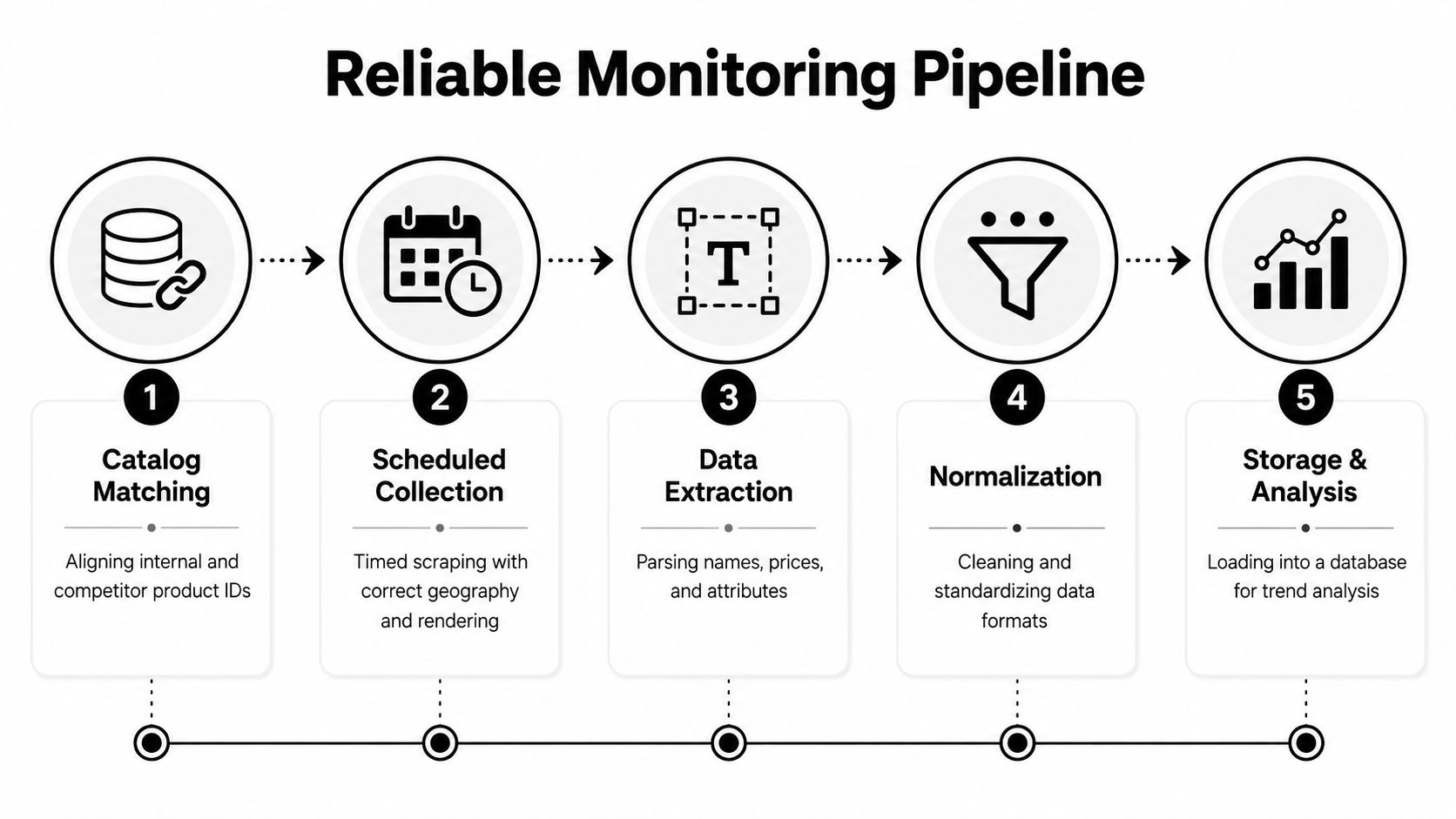
Stage 1: Catalog matching
Teams lose hours here. Competitor listings rarely reuse your internal SKU, so you need a mapping layer that starts with UPC, EAN, ASIN, and MPN, then falls back to attributes like brand, model, size, and pack count If this stage is wrong, every downstream price comparison is wrong too.
Stage 2: Scheduled collection
Collection needs the right geography, rendering, and interval. A site can show different prices by region, logged-in state, or device profile, so the site crawler has to simulate the customer you care about. If you skip this, you end up with clean data that describes the wrong offer.
Stage 3: Extraction and normalization
Extraction turns HTML into fields. Normalization turns those fields into something you can compare over time. That’s where currency symbols, thousands separators, decimals, and bundle structures get cleaned up so a price stream can support pricing rules later.
Stage 4: Time-series storage
A one-off scrape is a snapshot. Time-series storage is what lets you ask whether a competitor raised prices after a promotion or only changed its shipping presentation. Without history, every run becomes a dead end.
Stage 5: Alerting and delivery
Alerts only matter if someone receives them in a usable channel. Pricing teams usually need email, Slack, webhooks, or a warehouse feed, not another dashboard they have to remember to open.
A brittle scraper answers one question once. A reliable pipeline answers the same question every day, with enough context to trust the answer.
Choosing Competitors and SKUs Without Overreaching
The safest rollout starts smaller than most stakeholders want. Pick a narrow SKU set, anchor it to 2 to 3 competitors, validate every match by hand, and only then expand. That sounds slow until you compare it with the time wasted chasing false positives from bad matches.
Matching order matters
Start with stable identifiers first, then compare attributes. In practice, that means trying UPC, EAN, ASIN, and MPN before you lean on brand, model, size or pack count. That order matters because visual similarity is not identity. Two pages can look interchangeable and still represent different pack sizes, regional variants, or bundled offers.
A published pilot playbook recommends mapping 200 to 500 products to 5 to 8 competitors, running a 30-day pilot, doing daily spot-checks of product matches, and waiting until match accuracy reaches 95% before pricing rules go live. That’s not perfectionism. It’s the cheapest way to avoid automating on bad data.
Rule I’ve learned the hard way: never let pricing automation sit on top of an unverified match map. If the match is wrong, the decision logic is just a fast way to make the wrong move.
For competitive scope, it helps to prioritize the items that matter most first. One tracking guide recommends flagging products where you are 5% or more above or below competitors and focusing on the top 20 SKUs across the top 3 competitors (e-commerce playbook). That gives the business something useful without pretending the entire catalog is equally urgent.
The practical trade-off is simple. Narrow scope gives you trust. Broad scope gives you coverage. Start with trust.
Building Scraping Agents with Playwright and Puppeteer
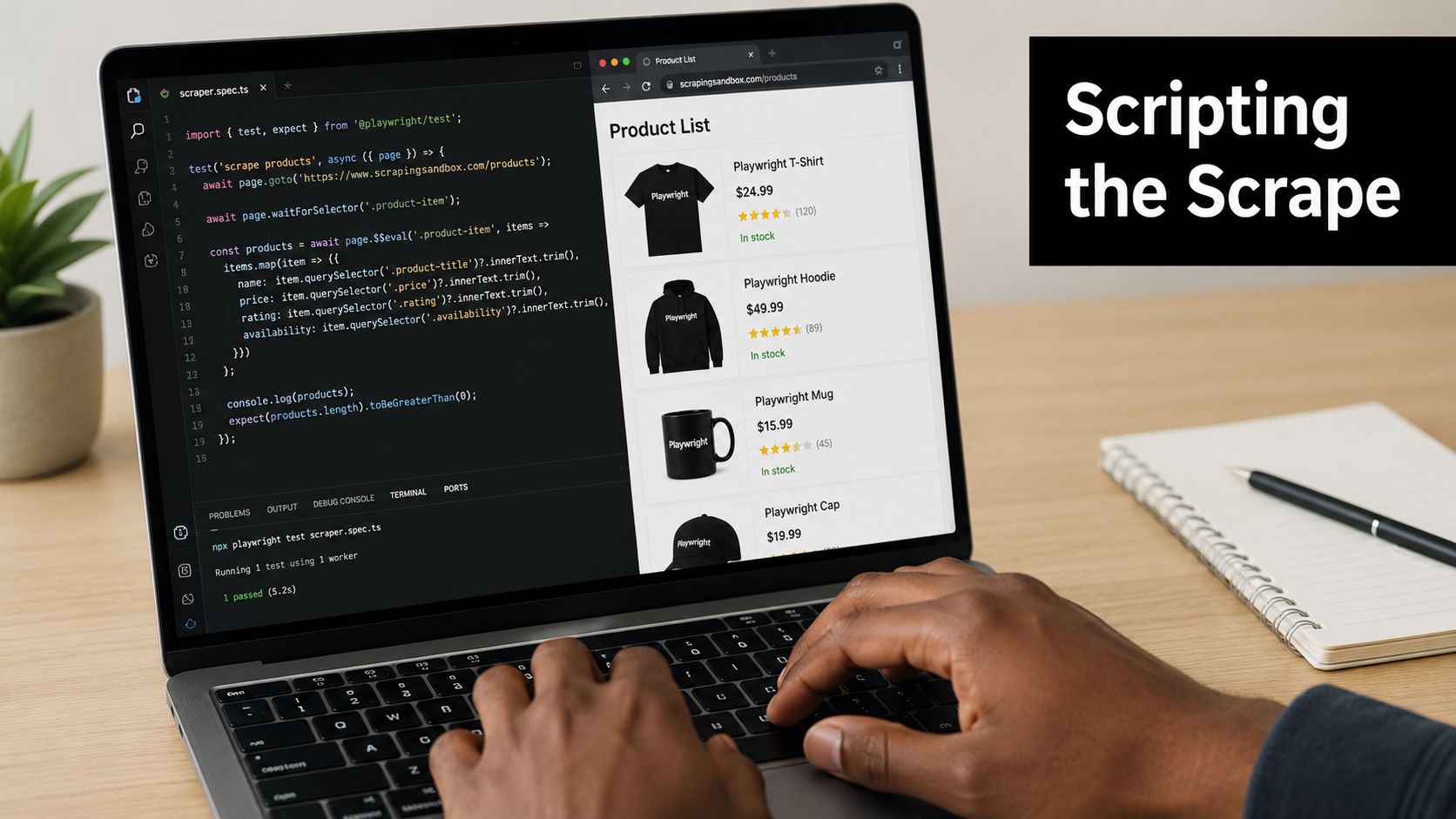
A product-listing scraper should do three things well. It should wait for JavaScript-rendered content, extract names and prices consistently, and follow pagination without guessing. The easiest way to prove that logic is to test it against a sandbox site like Scraping Sandbox, where you can reproduce failures without risking a production target.
Playwright example
import { chromium } from 'playwright';

async function scrapePage(url) {
  const browser = await chromium.launch({ headless: true });
  const page = await browser.newPage({
    viewport: { width: 1366, height: 900 },
    locale: 'en-US'
  });

  await page.goto(url, { waitUntil: 'networkidle' });
  await page.waitForSelector('.product-item');

  const items = await page.$$eval('.product-item', cards =>
    cards.map(card => ({
      name: card.querySelector('.product-title')?.textContent?.trim() || null,
      price: card.querySelector('.product-price')?.textContent?.trim() || null
    }))
  );

  const nextHref = await page.locator('a[rel="next"], .pagination-next a').getAttribute('href').catch(() => null);

  await browser.close();
  return { items, nextHref };
}
Puppeteer example
const puppeteer = require('puppeteer');

async function scrapePage(url) {
  const browser = await puppeteer.launch({ headless: true });
  const page = await browser.newPage();

  await page.setViewport({ width: 1366, height: 900 });
  await page.setExtraHTTPHeaders({ 'accept-language': 'en-US,en;q=0.9' });

  await page.goto(url, { waitUntil: 'networkidle2' });
  await page.waitForSelector('.product-item');

  const items = await page.$$eval('.product-item', cards =>
    cards.map(card => ({
      name: card.querySelector('.product-title')?.innerText.trim() || null,
      price: card.querySelector('.product-price')?.innerText.trim() || null
    }))
  );

  const nextHref = await page.$eval('a[rel="next"], .pagination-next a', el => el.href).catch(() => null);

  await browser.close();
  return { items, nextHref };
}
| Criterion | Playwright | Puppeteer |
|---|---|---|
| Browser coverage | Strong across Chromium, Firefox, and WebKit | Chromium-first |
| Auto-waiting | More opinionated and forgiving | You manage timing more manually |
| Locator ergonomics | Excellent for resilient selectors | Solid, but a bit more hands-on |
| Multi-browser testing | Easier to standardize | Usually less central |
| Fit for price monitoring | Great when page behavior varies by browser | Great when you want a lean Chromium flow |
A few production habits matter more than framework choice. Save raw HTML alongside extracted fields so layout shifts are debuggable, and version each agent so a selector change doesn’t alter your dataset. The internal Puppeteer scraping guide is also useful if your team wants a more formal Node.js pattern to compare against.
If the team doesn’t have engineering bandwidth, a no-code workflow can still work for simpler catalogs. It won’t replace careful matching, but it can reduce the amount of custom code you need for stable pages.
Later, when you need a hosted workflow instead of maintaining browser runners yourself, Agenty is one option that provides web scraping agents, scheduling, and change detection in a managed setup.
Staying Undetected with Proxies and Anti-Detection Tactics
Once a scraper works locally, the next failure mode is almost always blocking. That’s where proxy choice starts to matter, because different targets fail for different reasons. Cheap volume, geo-sensitive pricing, and account-like behavior are not the same problem.
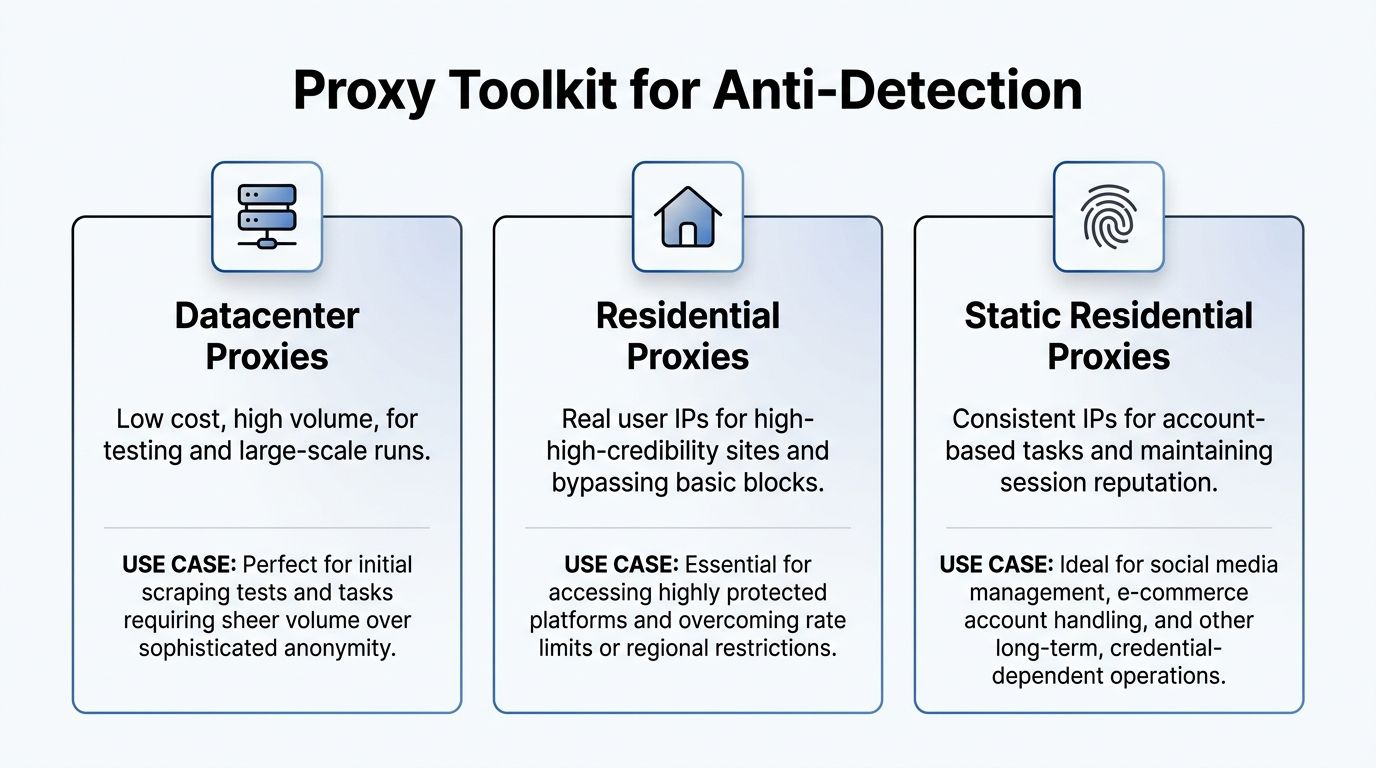
Matching proxy type to the target
Datacenter proxies are the right starting point for testing and high-volume runs when the site isn’t aggressively filtering automation. Residential proxies make sense when the target is stricter and wants traffic that looks like real consumers. Static residential proxies are the best fit when the same location or reputation needs to stay stable, especially for geo-sensitive pricing and session-heavy workflows.
Browser fingerprinting is the other half of the problem. User agents, headers, viewport, and language all need to align with the traffic you’re trying to mimic. A headless browser that ignores those details can get through a few runs, then start tripping the same defenses every time the site notices a pattern.
If the category updates every few hours, don’t hit the same IP on a tight loop. Rotate identity with enough discipline that your own monitoring cadence doesn’t become the block reason.
A practical rule is to spend on stronger proxies only when the target earns it. For a small pilot on stable pages, datacenter IPs are often enough. For hardened retail targets with location-sensitive pricing, residential or static residential becomes worth the cost because blocked runs are more expensive than proxy traffic.
The linked anonymous web scraping guide is a useful reference if your team wants to formalize that layer instead of treating it as an afterthought. Anti-detection isn’t about cleverness. It’s about keeping the data stream alive long enough for the business to trust it.
Scheduling, Delta Detection and Clean Numbers
A monitor that only captures snapshots will miss the part that matters in production. A schedule plus delta detection shows what changed, when it changed, and whether that change is real enough to trigger an action.
Cadence should follow volatility
Fast-moving products need tighter loops, stable products do not. One strategy guide recommends hourly monitoring for high-velocity products, daily monitoring for core inventory, and weekly monitoring for stable items. That keeps run costs tied to business value instead of spending the same compute on every SKU.
| Category | Suggested Cadence | Why |
|---|---|---|
| High-velocity products | Hourly | Prices and promotions move fast, so stale data is expensive |
| Core inventory | Daily | Enough freshness for routine repricing and review |
| Stable items | Weekly | Lower volatility, lower operating cost |
A practical way to set cadence is to start with the products that already move margin. If a category has heavy promotion churn, shorter intervals make sense. If a SKU rarely changes and the site is slow to update, a longer loop reduces wasted runs and makes failures easier to spot because they are not buried in noise.
Delta detection should compare runs, not pages
Good monitoring compares the new run against the previous one. It should track price, stock state, and promotional badge, then store only the fields that changed when the delta is meaningful. A competitive framework recommends a manual baseline first, then daily page monitoring with a severity filter so cosmetic changes do not trigger alerts.
That distinction matters once you have more than a few monitored SKUs. A changed timestamp, reordered HTML, or temporary badge can look like a price move if the detector is too loose. A clean implementation keeps the comparison at the business field level, not the raw markup level, so the alert means something a merchandiser can trust.
Normalize before you compare
Formatting is where a lot of pipelines break. Currency symbols, thousand separators, locale-specific decimals, and bundles all distort naive comparisons. A pack price can look lower on the page while the unit economics got worse, so the pipeline has to normalize the headline number and the surrounding context before it decides whether there was a real change.
Operational rule: if the stored value cannot survive a locale change or a bundle presentation change, it is not ready for pricing logic.
For teams that want a managed layer for change tracking, the Agenty change detection agent fits naturally into this part of the workflow. It is still worth checking the output against your own SKU rules, because automated change detection is only useful when the match is clean enough for pricing work.
For analysis beyond raw tracking, some pricing teams also use Van Westendorp or Gabor-Granger, and one guide says 50 respondents is enough for directional data (competitive pricing analysis). That belongs in pricing research, not scrape execution, but it helps when you are deciding whether a detected move is just noise or a real market signal.
Alerting, BI Integration and Operational Hygiene
Alerts are only useful when they reach someone who can act, and only when the threshold is tight enough to avoid noise. One practical rule is to flag products where you are 5% or more above or below competitors, then prioritize the top 20 SKUs across the top 3 competitors so the team can focus on the few items that move margin
What good delivery looks like
Email works for slower workflows. Slack works when pricing and merchandising need to react quickly. Webhooks work best when the output needs to feed a warehouse, BI layer, or pricing engine without a human in the loop. The important part is not the channel, it’s making sure the alert has the competitor, SKU, old value, new value, and match confidence in the same payload.
Downstream, the cleaned stream should land in dashboards and models, not just in a notification feed. Once prices are normalized and stored as time series, BI teams can compare trends, and ML pipelines can use the history for elasticity work or repricing logic.
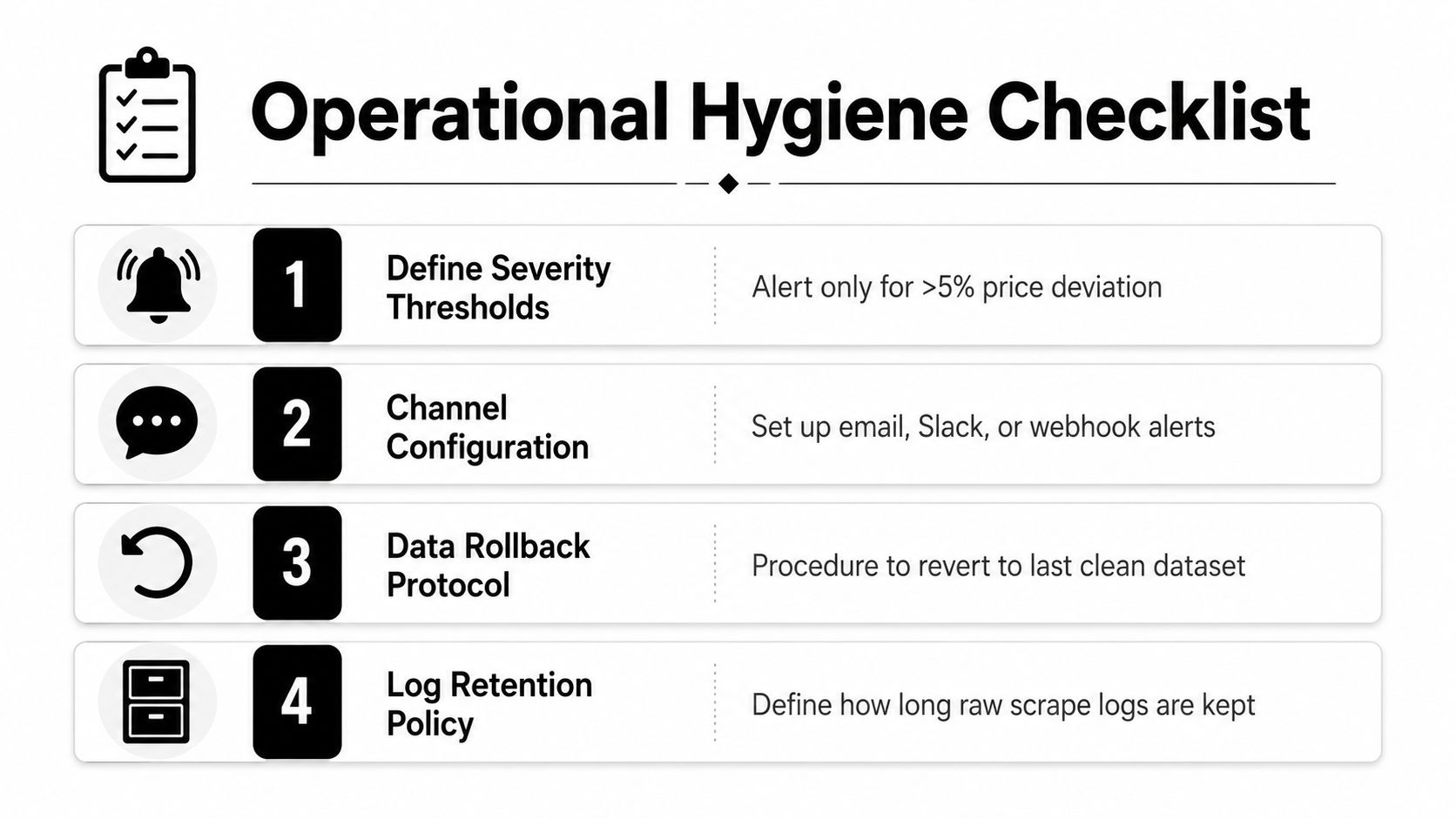
Operational hygiene keeps the whole thing honest.
- Define severity thresholds. Don’t alert on cosmetic changes. Alert on meaningful deviation.
- Configure delivery channels. Pick email, Slack, or webhook based on who owns the response.
- Keep rollback paths ready. If a mapping breaks, the team needs a path back to the last clean dataset.
- Retain raw logs long enough to debug. If a scraper fails, the HTML and run history should still be available.
Before broad rollout, gate automation on pilot match accuracy instead of gut feel. That’s the line between a system that helps pricing and a system that just creates faster confusion. If you want to put this into practice this week, start with one category, verify the SKU map by hand, run a short pilot, and only then connect alerts to the team’s normal workflow.