PDF to Markdown Converter
Convert up to 10 PDFs concurrently into clean Markdown for AI, LLMs, and RAG.
Drop your PDFs here
or click to browse — up to 10 files
Your files are processed on server and not stored
Frequently asked questions
What is a PDF to Markdown Converter?
The PDF to Markdown Converter extracts text, headings, lists, and tables from PDF files and converts them into clean, structured Markdown(.md files). It's ideal for AI training datasets, knowledge bases, documentation, and LLM workflows.
Follow these steps to start the conversion:
- Browse & Upload your PDF files. You can upload up to 10 PDFs at once for bulk conversion.
- Click Convert to begin extracting the content and converting each PDF into Markdown.
- Wait while the Agenty's servers process your files, then download all generated Markdown (.md) files in one click.
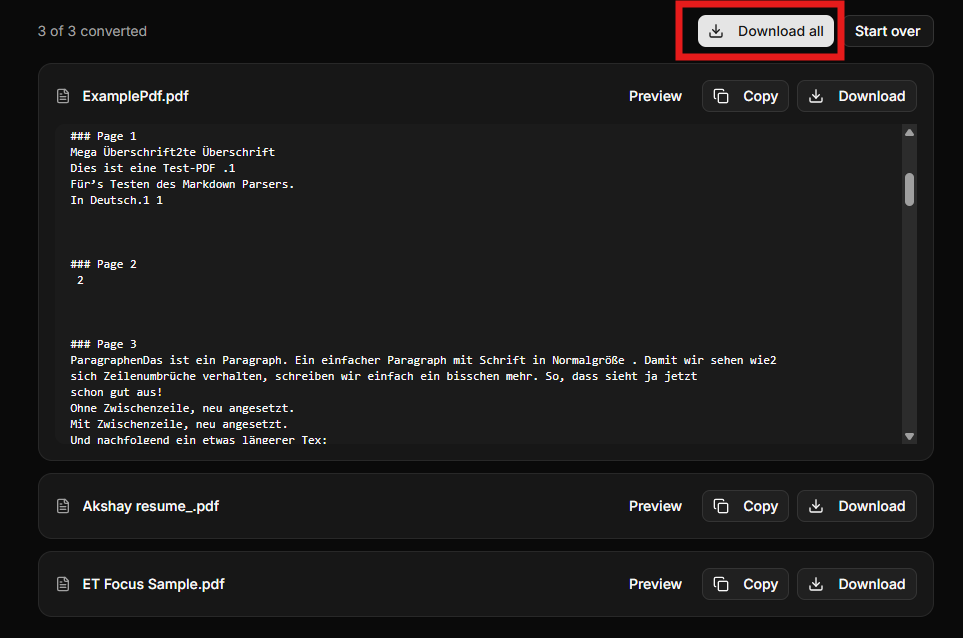
Can I convert multiple PDFs at once?
Yes. bulk PDF to Markdown conversion is supported, allowing you to process up to 10 PDFs concurrently. This makes it easy to prepare large document collections for AI, RAG, or documentation projects.
Why convert PDF to Markdown for AI and LLMs?
Markdown is significantly easier for large language models to parse than raw PDFs. Converting PDFs into structured Markdown improves indexing, retrieval, chunking, and overall performance for RAG, AI agents, chatbots, and semantic search systems.
How do I use the API to automatically convert PDF to Markdown in my application?
You can integrate the PDF to Markdown API into your application to automatically convert PDF documents into clean, structured Markdown. Simply upload the PDF using multipart/form-data with the field name file. The API returns the extracted Markdown content, making it easy to build document ingestion pipelines, AI agents, knowledge bases.
Here's a JavaScript example using the Fetch API:
const formData = new FormData();
formData.append('file', pdfFile);

const response = await fetch('https://api.agenty.ai/v1/parser', {
  method: 'POST',
  headers: {
    Authorization: `Bearer YOUR_API_KEY`,
  },
  body: formData,
});

const result = await response.json();
console.log(result);
The API supports integration with JavaScript, Node.js, Python, PHP, Go, and any language capable of sending HTTP requests. It's designed for high-volume document processing.
 Add to Chrome — it's free